
The secure virtual data room
for every deal.
TrueScreen brings documents, people, AI search, signature and escrow into one room, with full control over who sees what, and when.
Trusted by 20,000+ customers
Document management
Every document of the deal, in the right place.
AI document assistant
Answers in seconds, not after hours of reading.
Integrations
Files arrive from the tools you already use.
Security
Confidential documents, shared without losing control.
Built for deals, disputes and escrow.

Deals and tenders
Share the deal with buyers and advisers.
- M&A due diligence
- Contract negotiations
- Public tenders

Disputes
Keep every document of the dispute in order.
- Litigation
- Arbitration
- Internal investigations

Escrow and IP
Lock what matters until the conditions are met.
- Document escrow
- Source code escrow
- Intellectual property
The whole deal, organised in one room.
Upload, organise, discuss, sign and close the deal without leaving the room.
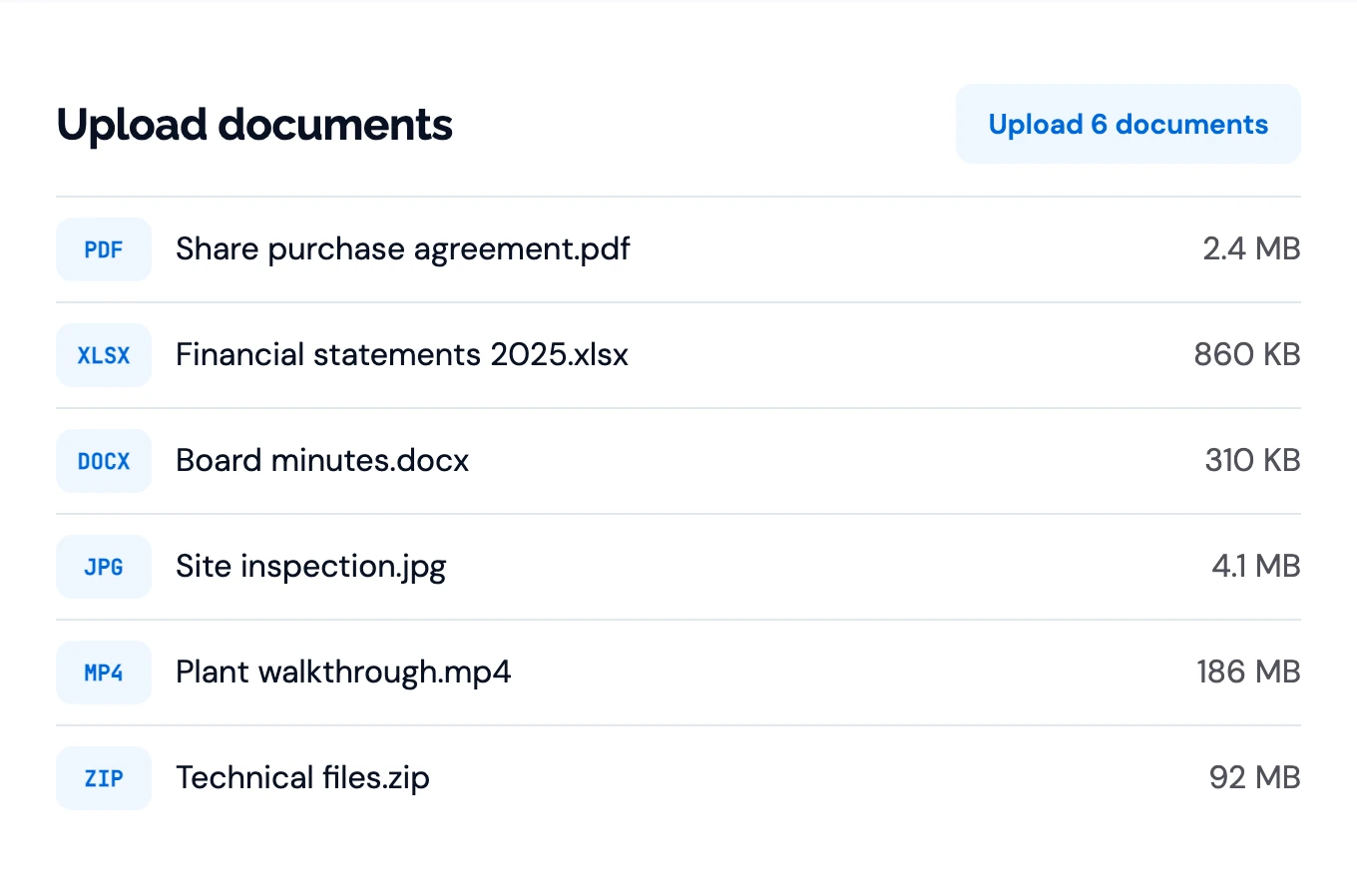
All your files in one room
PDF, Office files, images, video, audio and archives, in folders.
Every version kept
Each new version is added to the history of the file.
Request a file
Ask anyone, even outside the room, for a document: it lands in the folder you choose.
Signature in 30 seconds
Members and outside signers sign in the browser, with full legal value.
Comments
Comment a point of a page or a passage of text.
Checklist
See what is missing or in the wrong place.
Approved
Q&A with approval
Buyers ask, experts answer, you approve.
Save as template
Room templates
Start the next deal from the folders of the last one.
Daily digest
An email every morning with the activity of the room.
Ready in minutes
Start from a template and drag in whole folders: the room is ready in minutes.
The room in your language
The room speaks English, Italian, Spanish, German, French and Portuguese.
Archive and export after closing
Export the room with its audit trail, and keep it available read only.
Ask your documents, get the page that answers.
Ask in plain words: the answer cites the document and the page.
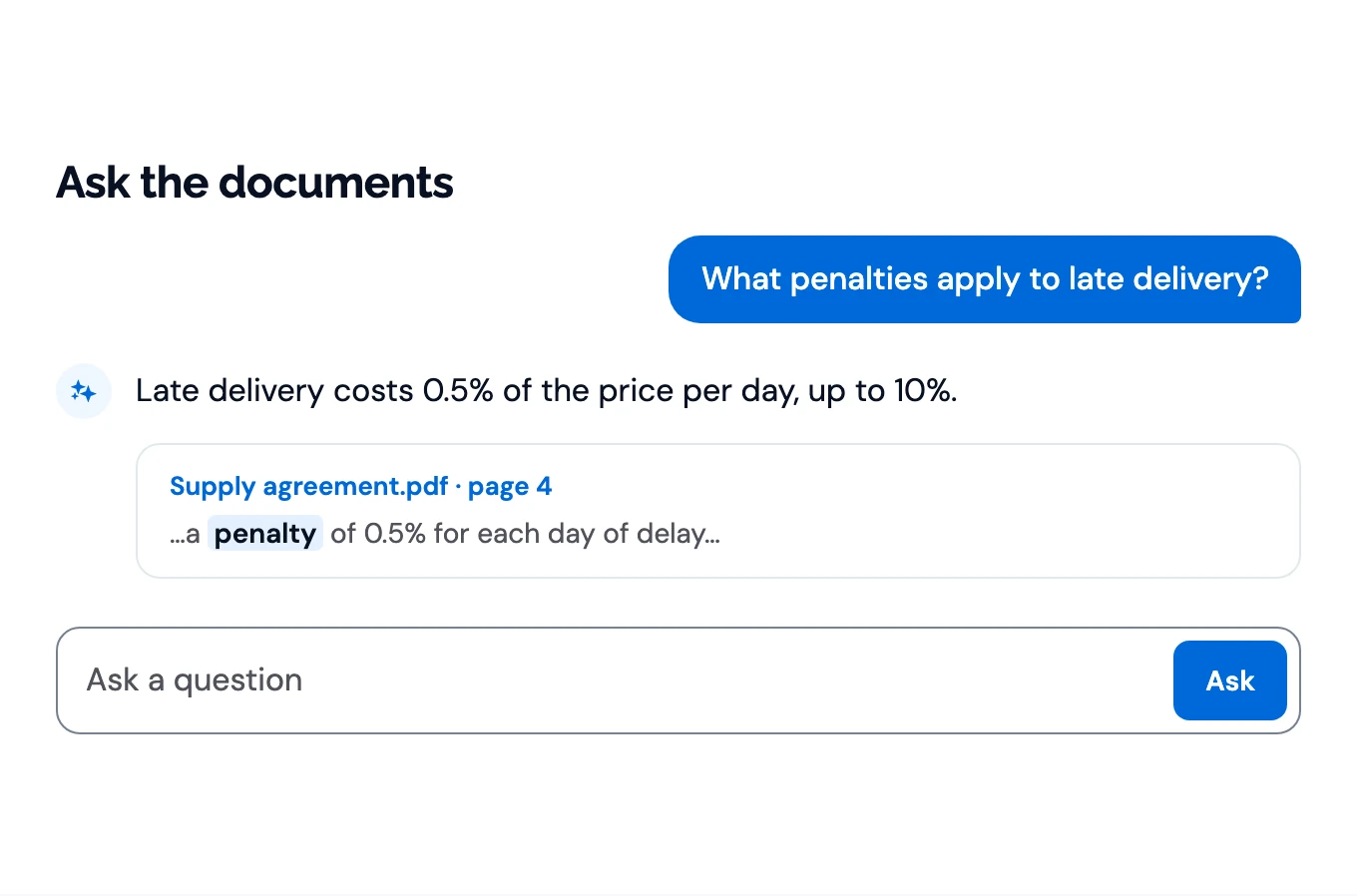
Ask the documents
Questions in plain words, and a full-text search inside every file.
Summaries on request
A summary of any document, when you need it.
Automatic data room index
Indexing, clear names, duplicates found and passages to redact.
Google Drive, SharePoint and Dropbox, straight into the room.
Bring files in from the tools your team already uses.
 Google Drive
 SharePoint
 OneDrive
 DropboxEmail
 GitHub
 GitLab
 Bitbucket
 Azure DevOps
 Claude
 OpenAI
 GeminiGoogle DriveSharePoint or OneDriveDropbox
Google Drive, SharePoint, OneDrive and Dropbox
Pick files with your own account: they land in the folder you have open.
Documents by email
Each room has its own address for attachments sent by its members.
v1.4.0Code folders from your repositories
GitHub, GitLab, Bitbucket and Azure DevOps: each repository becomes a folder, updated at every new release.
MCPClaude, OpenAI and Gemini
Work with the room from your AI assistant through MCP, or from your systems with API and webhooks.
Full control over who sees what.
Every access decided by you, and every action on record.
Roles and access by folder
Administrators manage, Editors upload, Viewers read.
Complete audit trail
Every upload, view, download and share, ready to export.
Certified documents
Every file and version recorded with its fingerprint, then certified.
Dynamic watermark
Every preview carries the name of the viewer and the time.
Protection per document
Decide who can view, print or download each document, or give access until a date.
Enter the room
NDA before entry
Guests accept an NDA before entering.
Who can request signatures
The Admin decides, person by person.
Guests without an account
Outside guests join with a one-time code sent by email.
Encryption
Data encrypted in transit and at rest.


Built for European rules
GDPR and DPA, EEA servers, qualified seal and timestamp under eIDAS.
Buyer activity
Which documents each buyer and adviser opens, and how often.
Revoke access at any time
Remove a person or a folder from their access, and it stops at once.
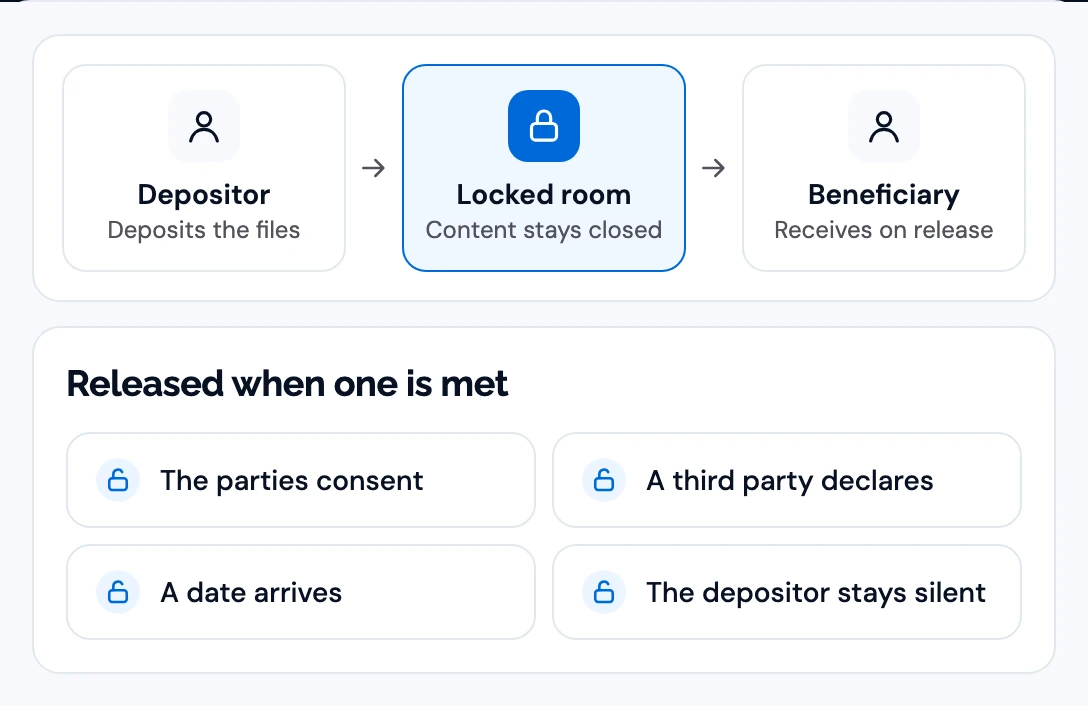
Released on the conditions you set.
Documents or source code stay locked in a dedicated room until the rules all parties accepted are met.
Built for the way large organisations work.
Dedicated support, tailored terms and the controls your security team asks for.
Virtual data room FAQ
What is a virtual data room (VDR)?
A virtual data room is a secure online space where a company shares confidential documents with third parties, such as buyers, lawyers or auditors, during a transaction or a dispute. The TrueScreen data room brings AI search, signature and escrow into the same room, and certifies the documents it holds.
How does AI search work in a data room?
Ask a question in plain words and the TrueScreen data room answers from the documents you are allowed to see, citing document, version and page for each statement. It also searches the full text of every file, with tags and filters to narrow the results.
What is a data room used for in due diligence?
In due diligence, the seller puts contracts, financial statements, tax filings and corporate records in a data room so the buyer and its advisers can review them under controlled access. The data room also records which documents were made available and who opened or downloaded them.
What is an audit trail in a data room?
An audit trail is the chronological record of what each participant did in the room: uploads, views, downloads and shares. In the TrueScreen data room the audit trail is certified with a qualified electronic seal and a qualified timestamp, so it can be exported and verified after closing.
What should a data room audit trail record?
A useful audit trail records who acted, on which document and which version, what the action was and when it happened. TrueScreen records every document on entry with its SHA-256 fingerprint and then certifies it, so each entry of the audit trail refers to a file whose integrity can be checked, not only to a file name.
How is a virtual data room different from file sharing?
File sharing tools move files; a virtual data room controls who sees what, by role and by folder, and records every action. The TrueScreen data room adds AI search, signature, escrow and a complete audit trail.
How do you set up a virtual data room?
Create the room, build the folder structure, upload the documents and invite participants with a role for each folder. In the TrueScreen data room external guests join from an invitation link confirmed with a one-time code, without creating an account.
What types of documents can you upload to a data room?
Usually contracts, financial statements, tax filings, corporate records and technical files. The TrueScreen data room takes PDF, Word, Excel and PowerPoint files, images, video, audio and archives. PDF, Office files and images open in the preview.
How do user roles and permissions work in a data room?
Roles decide what each person can do, and permissions decide which documents they can reach. In the TrueScreen data room, Administrators invite people and manage the room, Editors upload and organise documents, and Viewers read and download watermarked copies. Access is set folder by folder, and outside guests enter with an emailed one-time code, without an account.
How much does a virtual data room cost?
Virtual data room prices vary by provider, number of users, storage and length of the project. The TrueScreen data room is a paid option of the TrueScreen Business plan. Request a demo to discuss it.
Can documents be signed inside a data room?
Yes. In the TrueScreen data room, Administrators, and the people they enable, request a signature on any document in the room. The signer signs in the browser with a one-time code, without an account, and the signed document returns to the chosen folder with every step in the audit trail.
What does it mean when documents are held in escrow?
Documents held in escrow stay locked until the agreed conditions are met, for example the consent of the parties, a decision of a designated third party or a date. In the TrueScreen data room, when a release condition is met, every party is notified and an authorised party can object before the content is released.


