
How to fake a screenshot: date, place and messages that were never there
A fake screenshot takes a few minutes and no skill: a date and a place stamped into the corner, a message copied where it never was, camera metadata that say the picture comes from a Samsung phone. Everything a chat screenshot “proves” can be written into it after the fact. This guide shows how to fake a screenshot step by step, and then why a screenshot never proved anything on its own.
To do it we use GoTamper.it, a complete, free and public tool for modifying any kind of file (photos, videos, screenshots, PDFs, audio) directly in the browser: nothing is uploaded and nothing is stored. The chat used here is invented: the names and the messages are fiction.
This guide is part of a series that starts with how to tell if an image is AI generated.
Fake a screenshot in four steps
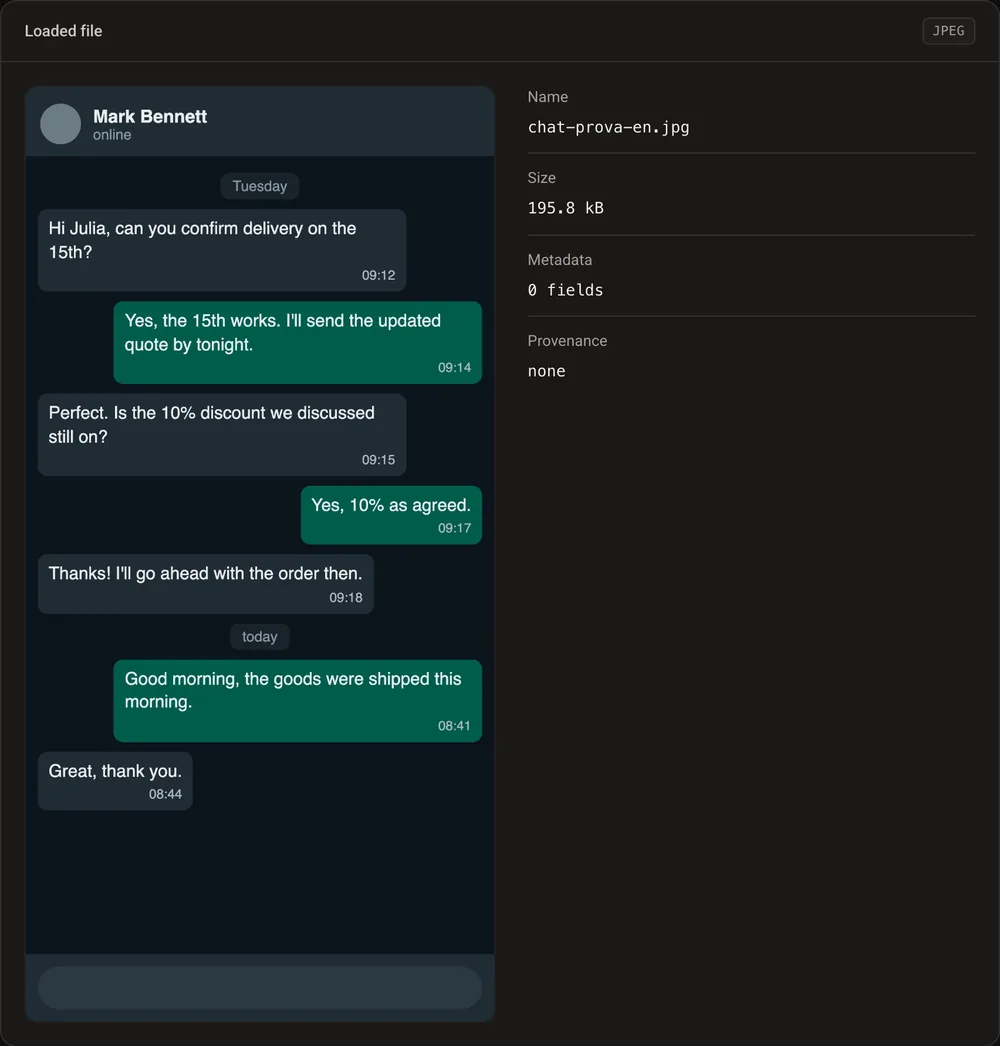
Step 1: load the screenshot
Drag the screenshot onto GoTamper.it. Ours is a chat about a delivery and a discount, 1170 by 2340 pixels, with no metadata at all: a screenshot never has a camera, a date or a place inside it. That is the first thing worth remembering.
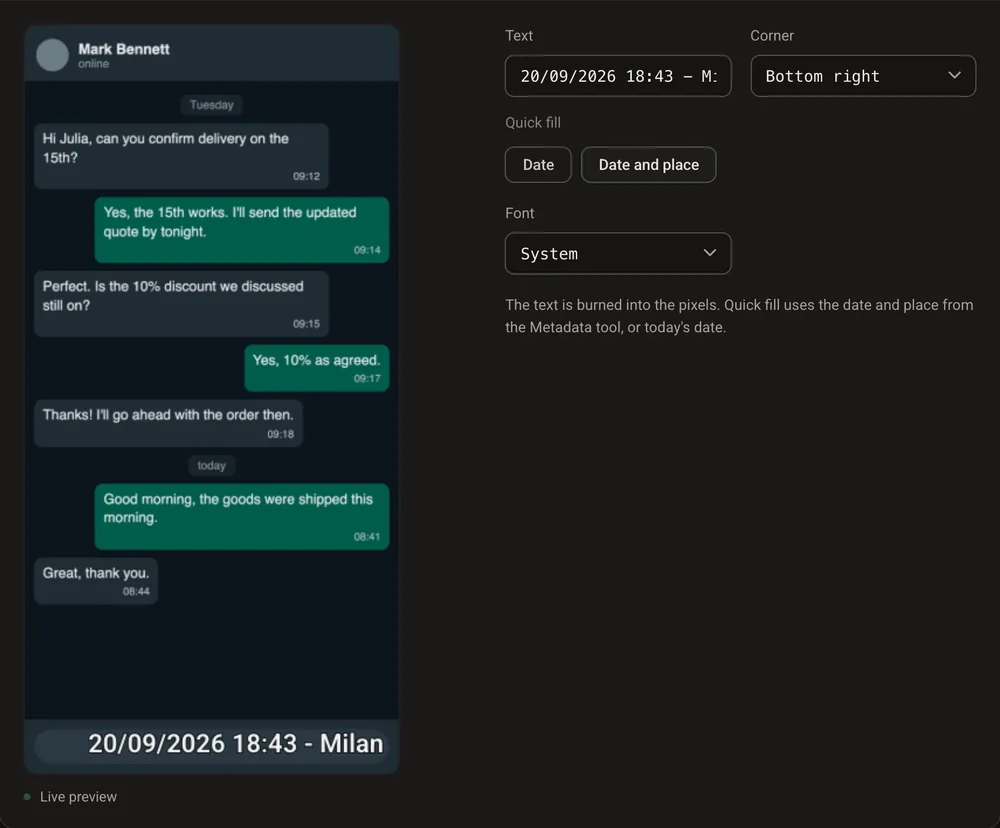
Step 2: stamp a date and a place into the pixels
Open the Overlay text tab and press Date and place. GoTamper.it writes the current date, the time and the place you chose in the corner of the image, in the pixels, like the stamp of a camera app. Ours says 20/09/2026, 18:43, Milan.
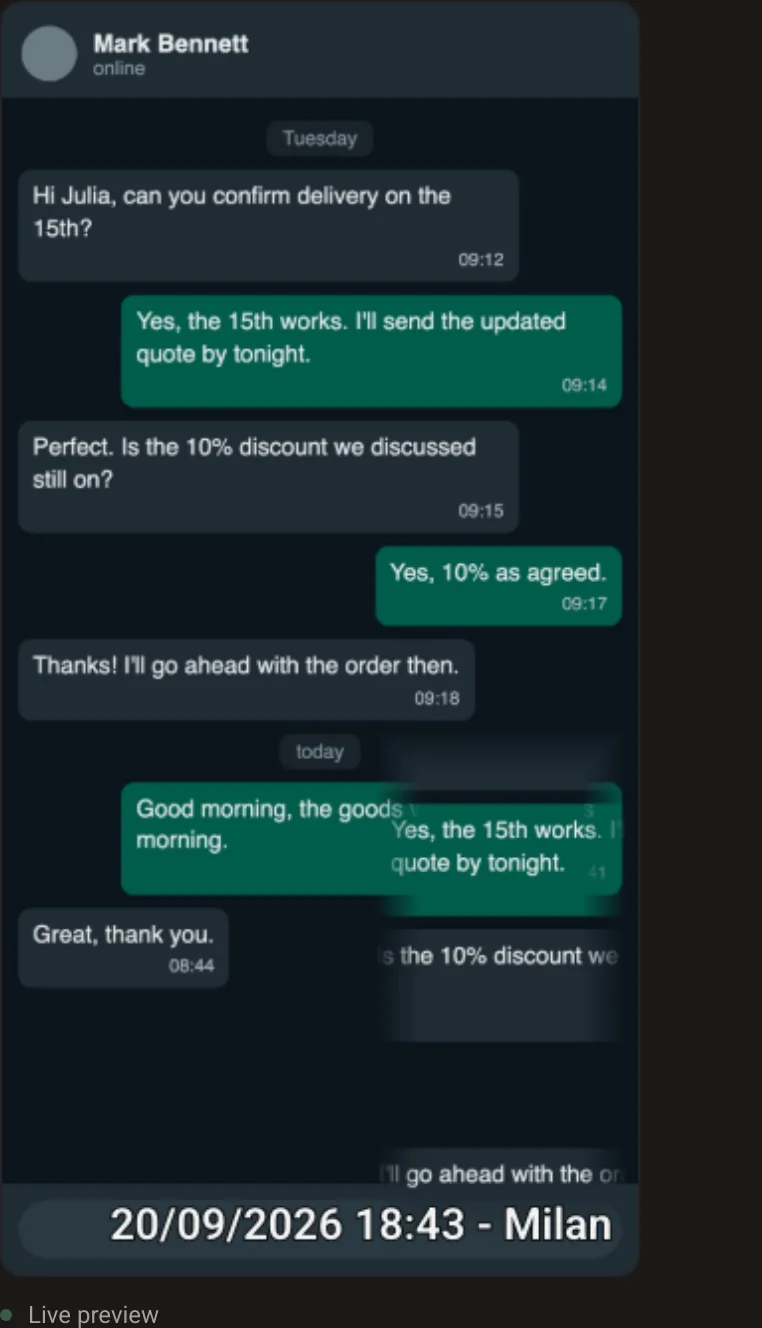
Step 3: make a message appear
Open the Alterations tab and move the Clone patch slider. It copies one area of the image over another: in a chat, this makes earlier messages reappear lower down, where they never were. GoTamper.it does it crudely on purpose, to show the mechanism; a patient hand with any image editor does it cleanly.
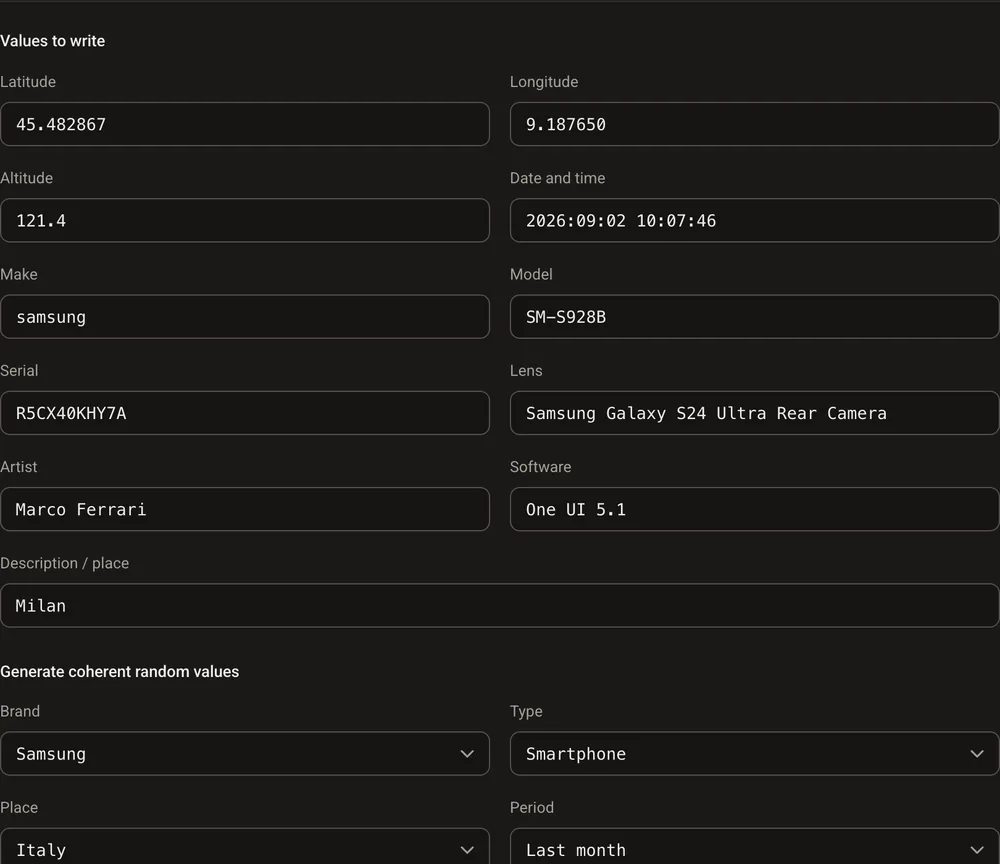
Step 4: give it a phone, a date and a location
In the Metadata tab choose Rewrite and use the generator: Samsung, smartphone, Italy, last month. The screenshot now carries a Galaxy S24 Ultra, One UI 5.1, coordinates in Milan and a date in early September. Open Result and download: 0 fields before, 18 after.
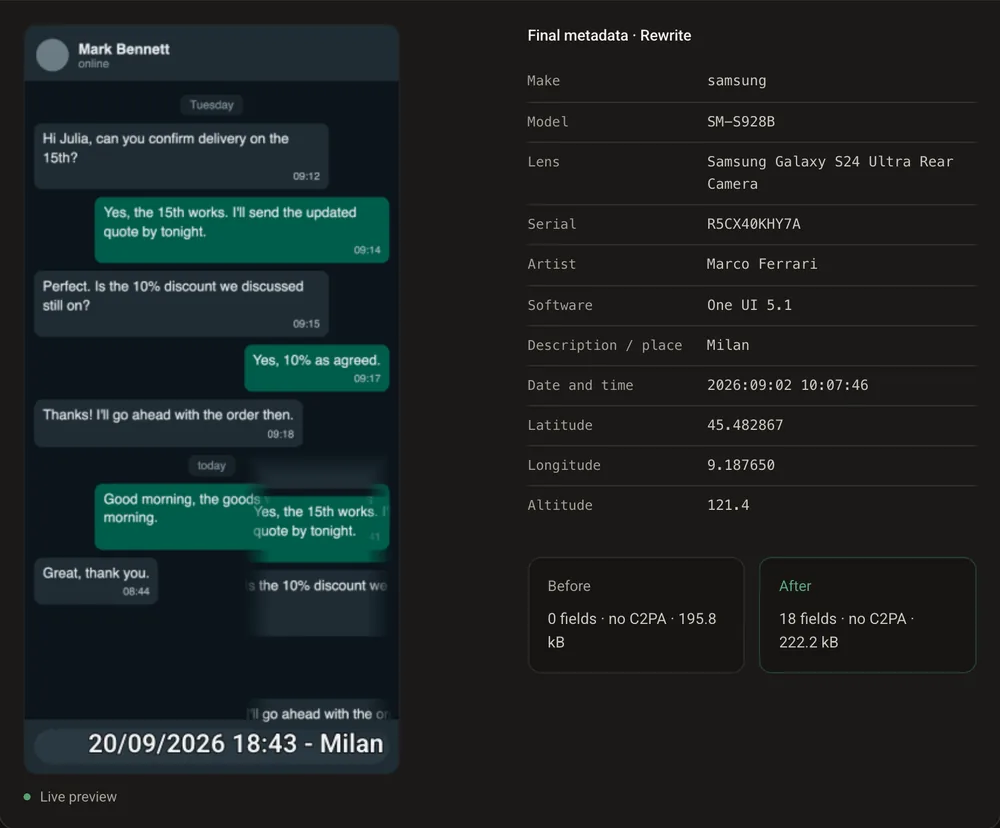
Result: a chat that never happened, with a date, a place and a phone attached.
Or generate it from scratch with AI
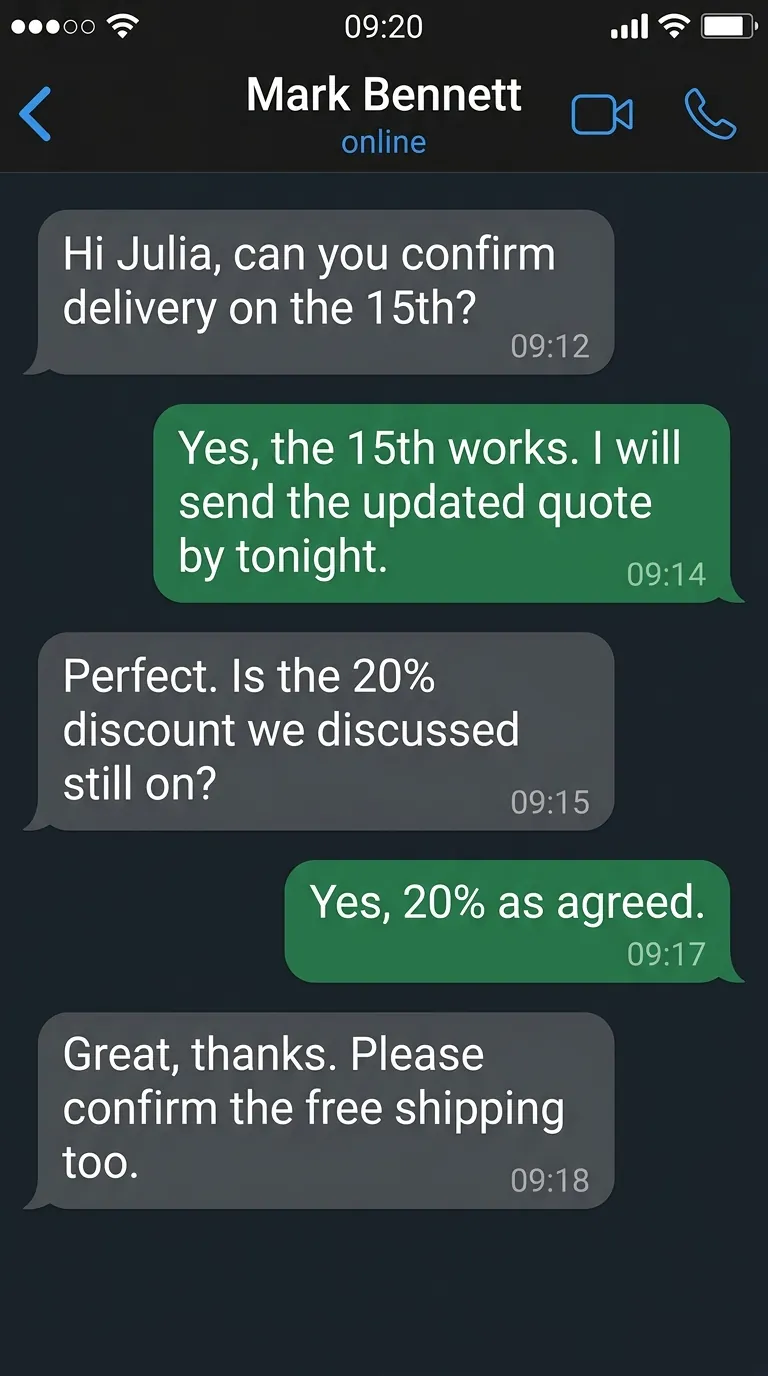
If the screenshot has to say exactly what you want, you do not even need a real one to edit: an AI image generator makes it from a description. We asked Gemini for a dark chat with a given contact, five messages with times and a status bar, and got the image here in under a minute. The names, the 20% discount and the free shipping are all in the prompt. Load it into GoTamper.it and step 4 gives it a phone, a date and a place like any other screenshot.
An AI generated screenshot leaves its own marks, though. This one is 768 by 1376 pixels, a size no phone screen uses, and it comes with Content Credentials that say, inside the file, that it was generated by an algorithm and signed by Google:
$ c2patool chat-ai.png
claim_generator   : Google C2PA Core Generator Library
digitalSourceType : trainedAlgorithmicMedia
signature issuer  : Google LLC
signature time    : 2026-09-20T16:48:55+00:00
$ exiftool -ImageSize chat-ai.png
Image Size        : 768x1376
One click in the Metadata tab removes them, as how to remove Content Credentials shows. A file without Content Credentials is not suspicious for that reason; it just says less. And that is the real problem of a generated chat: there is no app, no phone and no server behind it, so there is nothing to compare it with.
What the command line shows
The same check with ExifTool. Before, the screenshot has nothing to say except its size:
$ exiftool -Make -Model -Software -DateTimeOriginal -GPSLatitude -ImageSize screenshot.jpg
Image Size        : 1170x2340
After, it claims a phone, a date and a place. And it keeps its size, which is where the story falls apart:
$ exiftool -Make -Model -Software -DateTimeOriginal -GPSLatitude -ImageSize screenshot-fake.jpg
Make              : samsung
Model             : SM-S928B
Software          : One UI 5.1
Date/Time Original: 2026:09:02 10:07:46
GPS Latitude      : 45 deg 28' 58.32" N
Image Size        : 1170x2340
What still gives the game away
A screenshot is a picture of a screen, and every change to it leaves a mark:
- 1170 by 2340 pixels is an iPhone screen; a Galaxy S24 Ultra takes screenshots at 1440 by 3120. The metadata and the image tell two different stories;
- a screenshot has no camera metadata at all: any camera, lens or GPS field in a screenshot was added afterwards;
- the date stamp in the corner is drawn text, with edges and anti-aliasing that do not match the rest of the interface;
- the cloned bubbles are identical, pixel for pixel, to the originals, and the cloned area has hard edges;
- an AI generated screenshot has a size no phone uses and, until someone strips them, Content Credentials that say it was generated;
- the app itself keeps the real conversation, on both phones and often on a server: a screenshot is a copy of a copy.
Faking a screenshot is easy; defending one is not. Courts look at the context: in Italy, Supreme Court ruling 6024/2026 admitted WhatsApp screenshots handed over by a stalking victim without seizing her phone, because nothing cast doubt on her credibility, as our article on that ruling explains. When credibility is challenged, a screenshot with nothing documenting its origin and integrity is hard to defend.
Why this changes nothing for certified evidence
A screenshot is a picture; what needs proving is what happened on the screen. That is what TrueScreen certifies. Forensic Browser and the Chrome and Edge extension acquire the browsing session itself, page by page, with the network traffic, and seal it with the file’s fingerprint, a qualified electronic seal and a qualified timestamp, recognised internationally, in a report that anyone can verify. On a phone, the TrueScreen App does the same for photos and videos.
Stamp, clone and rewrite a screenshot all you like: it will never match a certified session, and the certified session is what a court asks for. How to certify a screenshot shows the steps.
Frequently asked questions about fake screenshots
How do you fake a screenshot?
With any image editor, or with GoTamper.it in the browser: a date and a place stamped into the corner, a message cloned where it never was, camera metadata rewritten. It takes minutes. The point of this guide is what happens next: every one of those changes leaves a trace, and a screenshot never proved anything by itself.
Can you tell if a screenshot is fake?
Often, yes. The size of the image and the phone in the metadata disagree, the stamped text has different edges, the cloned bubbles are identical to the originals, and the real conversation still exists in the app and on its servers. What a fake screenshot cannot survive is a comparison with the source.
Does a screenshot count as evidence?
It depends on the context. In Italy, Supreme Court ruling 6024/2026 admitted screenshots handed over by a stalking victim because nothing cast doubt on her credibility; if the other side brings specific signs of manipulation, you need to be able to show origin and integrity.
How do I prove what a web page or a chat really showed?
By certifying the session, not the picture. With Forensic Browser or the TrueScreen extension the browsing session is acquired and sealed with a qualified timestamp in a report that anyone can check, outside the file. The screenshot becomes an attachment; the proof is the report.
The session, not the screenshot
With Forensic Browser and the TrueScreen extension the browsing session is certified with a qualified timestamp and a qualified electronic seal: the screenshot becomes an attachment, the proof is the report.
TrueScreen editorial team
Published on · Updated on
This section is edited by the TrueScreen editorial team, which brings together expertise in digital forensics, the law of digital evidence and regulatory compliance. Every article is checked against primary sources: legislation, published rulings, technical standards and official documentation, always cited in the text.
Editorial Team and Methodology →


